Showing posts with label Home Design Ideas. Show all posts

Thursday, January 14, 2021

Xfinity xhk1-ue Zigbee Keypad Zigbee

Learn about the different types of keypad codes used to access your Xfinity Home Secure system. If you need immediate police assistance, press and hold the Panic button for two seconds to send a silent alarm to the Central Monitoring Station. The Lock button flashes red to indicate an alarm was sent. The status light turns red and flashes when the system is armed. The device makes beeping noises when arming and will beep faster as your security system gets closer to its armed state.

how to use xfinity home security keypad

Otherwise, Xfinity Home is a simple way to combine smart home tech and security. Learn how to use your Wireless Keypad to arm and disarm your Xfinity Home system and check your system status. The system starts with a base station, which is connected to the internet via ethernet or Wi-Fi. This base station acts as the hub for all communication between the system components.

Xfinity Home Security Review: The Best Professionally Installed Home Security System

You can also control your Nest Secure system using the Nest app. This makes it easier than ever to secure your home and keep it safe from intruders. The Exit Delay tone sounds and accelerates during the final 10 seconds of the delay. The arm button that you pressed turns red and flashes when the system is armed. Xfinity Home is a home security and automation system that offers protection and convenience to users.

When the Keypad wakes up, the LED indicators at the top and bottom of the Keypad will flash the status color. The Lock button will illuminate in the status color. When it comes to finding compatible security systems for Xfinity Home, there are several options available. The most popular security systems that work with Xfinity Home include ADT Pulse, Vivint SmartHome, Nest Secure, Ring Alarm, SimpliSafe, Wink Hub 2 and Arlo Pro. It sounds like you may have a flaky network, which I definitely did for the longest time. My guess is that you have a repeater not working right.

What is the difference between ARM stay and arm away?

We do not recommend moving the Wireless Keypad from its original installation location, as moving the device could cause it to malfunction. The battery life is approximately two to three years. I don’t know if this was a recent change to ZHA, but I’m very happy about it. It will still be in the Samsung Groovy IDE and can be easily reinstalled.

how to use xfinity home security keypad

But the other 70% it’s completely non-responsive / the automation does not run. When disarmed, when motion over keyboard, see green wireless symbol and green light at bottom of keypad. I ended up modifing the Centralite keypad device handler created by mitchpond to work with the Xfinity XHK1-UE Keypad. You can also integratea large and growing list of third-party devices into your Xfinity Home system. The list includes smart light bulbs from Lifx, Philips and Sengled, Chamberlain MyQ garage openers, August, Yale and Kwikset locks and even Tile trackers. Product support does change, however, so you may want to check the list before you set up an install.

How do you arm and disarm Xfinity alarm from keypad?

Touching keypad and long beep after pressing correct PIN code and pressing A. Touching keypad and long beep after pressing correct PIN code and pressing A . I bought one of these keypads on ebay not realizing that there weren’t any free device handlers currently available. There's a whole list of voice commands to control your smart home, view your camera feeds and find your keys or other stuff if you have a Tile tracker. It is particularly handy for turning off lights or adjusting your room temperature without getting off the couch or opening the app.
how to use xfinity home security keypad

The alarm panel is the main control unit for the system and allows users to manage all settings from one central location. The door and window sensors detect any opening or closing of doors or windows in your home, while motion sensors detect movement within certain areas. Smoke detectors are included as part of the system to alert you if there is a fire in your home.

Like the xFi integration, it's nice if you have Xfinity TV or are considering it along with Xfinity Home, but not a necessity. The button turns green for three seconds to indicate that the system has been disarmed. Read about arming and disarming your security system. The Keypad has a proximity sensor that senses when you are within six inches.

Xfinity’s alarms are designed to help protect and monitor your home, and can be customized to fit your needs. At the heart of the system at home is the Xfinity Home Station. Designed by Comcast, it has a better display and processing power than its predecessor for smoother, more responsive performance.

How does Xfinity alarm work

A majority of customers opt for the payment plan option, an Xfinity spokeswoman said. If you buy your equipment, you can end service whenever you want. Xfinity's little cameras have excellent image quality indoors and outside. The installers also updated my touchscreen security panel -- the Xfinity Home Station -- to what customers would have in their homes today. Push any button on the Honeywell or TCH/UEI Keypads.

Ring Alarm is an affordable and easy-to-install home security system that works with Xfinity Home. It includes door/window sensors, motion detectors, a keypad and a base station. You can also control your Ring Alarm system using the Ring app. Nest Secure is an easy-to-use home security system designed for DIY installation. It works with Xfinity Home and includes motion detectors, door/window sensors and a keypad.

What security systems are compatible with Xfinity Home

You can create as many Secondary Keypad Codes as you need. The only limitation is that each code must be unique and may not be the same as the Master Keypad Code. I set a master alarm code in my Zha config, but it didn’t make a difference. Both the network light and the indicator on the front of the keypad were solid green.

Xfinity Home Security Review: The Best Professionally Installed Home Security System

But the other 70% it’s completely non-responsive / the automation does not run. When disarmed, when motion over keyboard, see green wireless symbol and green light at bottom of keypad. I ended up modifing the Centralite keypad device handler created by mitchpond to work with the Xfinity XHK1-UE Keypad. You can also integratea large and growing list of third-party devices into your Xfinity Home system. The list includes smart light bulbs from Lifx, Philips and Sengled, Chamberlain MyQ garage openers, August, Yale and Kwikset locks and even Tile trackers. Product support does change, however, so you may want to check the list before you set up an install.

You can create as many Secondary Keypad Codes as you need. The only limitation is that each code must be unique and may not be the same as the Master Keypad Code. I set a master alarm code in my Zha config, but it didn’t make a difference. Both the network light and the indicator on the front of the keypad were solid green.
Check System Status

Want a lamp to turn on when your motion sensor is tripped and then turn itself off five minutes later? How about getting a push notification when a door or window opens? You can set up each of those in under a minute with a few taps. For those looking for a basic alarm system, Xfinity offers several packages that include door/window sensors, motion detectors, and contact sensors.

Pressing the speaker icon in center bottom will make keypad beep. Pressing the circle arrow icon will turn the keypad off. While it's easy to set up new rules, there aren't a lot of recipes to choose from. For instance, the only thermostat-related one is for getting a notification if it gets too hot or cold in your home. It can't, for example, adjust temperatures based on motion detection. There are no camera recipes, so you can't do something like have lights come on if your front porch camera picks up activity.

Arm and Disarm Your Xfinity Home Security from Your Wireless Keypad

The LED indicators will illuminate in the status color. Press the button for the Armed mode that you want to activate.

how to use xfinity home security keypad

The system uses a ZigBee-based protocol to communicate and operate over the 2.4 GHz radio frequency band. This system is designed to provide homeowners with maximum protection, and it is easy to use and customize according to your individual needs. Xfinity is a popular home security and automation provider, and their home security systems come with a range of features, including the ability to set up an alarm.

How does Xfinity alarm work

I really like the look of the Zen thermostat, it works well and it's easy to use. I certainly have those features on my personal router and have had no issues using it with Xfinity's security equipment. That said, those already with Xfinity Internet or considering getting it can expect a seamless experience with Xfinity Home based on my use of the two together. Xfinity Alarm is a comprehensive home security system that has been designed to help you keep your home and family safe and secure. It is a user-friendly and reliable system that can be easily installed and monitored by any homeowner. It provides a variety of features that make it an ideal choice for any home security needs.

Keep in mind the zha event will only trigger with a 4 digit code. That’s hard coded into the device from what I can tell. The A and B buttons also do nothing and can’t be used. I’ve been trying to use an xfinity keypad using this automation to open my garage door.

Arm System

Otherwise, Xfinity Home is a simple way to combine smart home tech and security. Learn how to use your Wireless Keypad to arm and disarm your Xfinity Home system and check your system status. The system starts with a base station, which is connected to the internet via ethernet or Wi-Fi. This base station acts as the hub for all communication between the system components.

how to use xfinity home security keypad

Learn about the different types of keypad codes used to access your Xfinity Home Secure system. If you need immediate police assistance, press and hold the Panic button for two seconds to send a silent alarm to the Central Monitoring Station. The Lock button flashes red to indicate an alarm was sent. The status light turns red and flashes when the system is armed. The device makes beeping noises when arming and will beep faster as your security system gets closer to its armed state.

Feel free to uninstall SmartThings and reinstall at any time. You will know keypad is paired by clicking Smartthings Classic, My Home, Xfinity XHK1-UE, Right Now, and seeing an interface. On SmartThings Classic app, My Home, Things, press the top right plus sign, Add a Thing, and wait for pairing to occur. Light new batteries will blink several times then repeat. I have this working with the SHM Delay Version 2.0 smartapp. Plan lets you add up to six cameras to your home (for $120 each) with 24/7 video recording for $10 a month.

how to use xfinity home security keypad

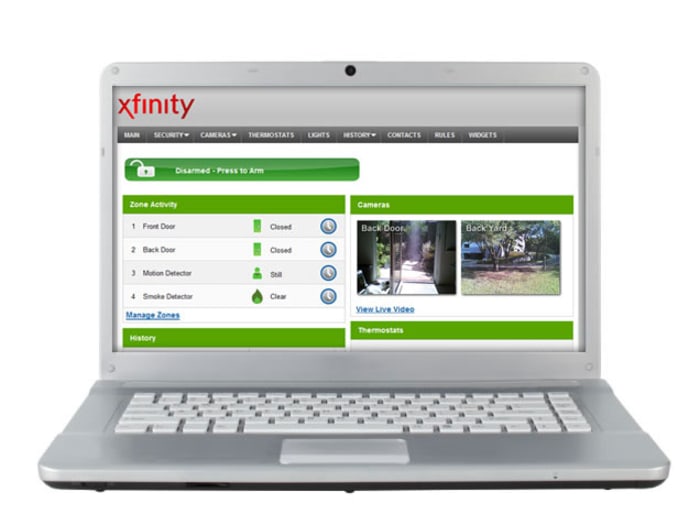
With Xfinity's mobile app, I can see if a window or door is open, a light is on or a motion sensor is actively triggered. Get notifications if there's water in my basement. And yes, I can use my phone to arm and disarm the system from my driveway, or anywhere else really. The main components of the Xfinity alarm system include an alarm panel, door and window sensors, motion sensors, smoke detectors, cameras, and a siren.

9 Timeless Hairstyles From the 70s That Will Always Be In Style

Table Of Content Jerry Hall's It-Girl Waves of The Best 70s Hairstyles for Women The bob WHERE BLACK CULTURE, COMMUNITY AND CONSCIOUSNES...